Classroom Name Picker: 7 Easy Ways to Choose Students Fairly
Choosing a student to answer a question, lead an activity, or present in front of the class sounds like a small classroom task. In practice, it can become surprisingly difficult. Teachers may have a room full of students, limited lesson time, and only a few volunteers raising their hands.
A Classroom Name Picker gives teachers a simple way to make student selection quicker, more balanced, and less predictable. Instead of always calling on the students who volunteer first, teachers can use a random selection method to give everyone an opportunity to participate.
The value of a Classroom Name Picker is not simply that it chooses a name at random. Used thoughtfully, it can help teachers create more inclusive discussions, keep students attentive, add variety to classroom activities, and reduce the time spent deciding who should participate next.
In this guide, we will look at how classroom name pickers work, when teachers should use them, practical classroom examples, important features to look for, and simple ways to make random student selection feel fair and comfortable for everyone.
What Is a Classroom Name Picker?
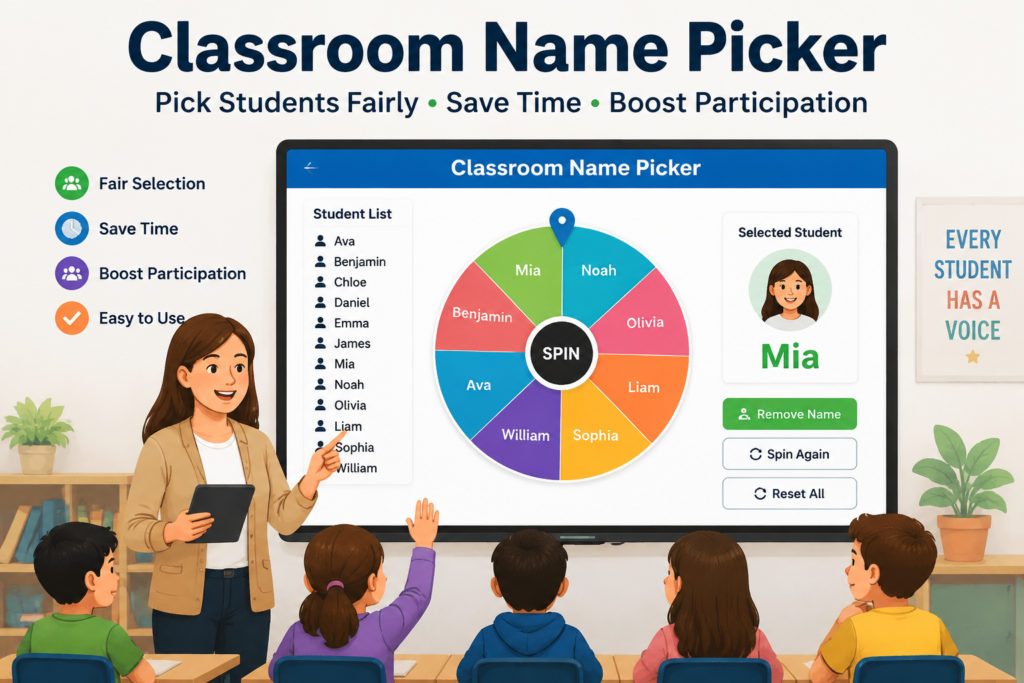
A Classroom Name Picker is a digital tool that randomly selects a student’s name from a teacher’s class list. The teacher enters the names of students, starts the picker, and the tool chooses a student for the activity.
The basic idea is straightforward, but it can solve a common classroom problem: deciding who participates without repeatedly relying on the same volunteers.
For example, imagine a teacher has 28 students and wants someone to explain the answer to a mathematics problem. Five students regularly volunteer, while several others rarely raise their hands. Instead of choosing from the same small group, the teacher can use a Classroom Name Picker to select a participant.
The teacher still decides whether the activity is appropriate for that student and can provide support when needed. The tool simply makes the selection process faster and more neutral.
Why Use a Classroom Name Picker?
Random student selection can be useful for much more than answering questions. It can become part of a teacher’s everyday classroom routine.
Teachers can use a name picker to select students for:
- Answering review questions
- Leading a short discussion
- Reading a passage aloud
- Presenting a project
- Demonstrating a solution
- Starting a classroom game
- Choosing an activity leader
- Sharing an opinion or idea
- Joining a classroom team
The best use of random selection is purposeful. Teachers should choose activities where participation can be supportive and productive rather than using randomness simply because a tool is available.
How a Classroom Name Picker Works
Most classroom name picker tools follow a simple process. The teacher provides the student list, chooses the desired selection method, and lets the tool make the selection.
1. Enter the Student Names
The first step is adding the names of students who are participating in the activity. Depending on the tool, names can usually be entered individually or pasted from an existing list.
Before starting an activity, teachers should check the list for duplicate names, spelling mistakes, or students who are not present that day.
2. Decide What You Want to Select
A teacher may need one student, several students, or a sequence of students. The right option depends on the activity.
For example, one student may be enough for a quick question, while a group activity may require several students.
3. Start the Random Selection
Once the list is ready, the teacher starts the Classroom Name Picker. The tool randomly chooses a name from the available students.
The result can then be used immediately for the classroom activity.
4. Decide Whether Selected Names Can Repeat
For some activities, allowing a student to appear again is perfectly reasonable. For others, teachers may want every student to have a turn before anyone is selected again.
A useful picker should therefore offer a way to remove selected students temporarily or keep track of previous selections.
7 Practical Ways to Use a Classroom Name Picker
A name picker becomes much more useful when it is connected to specific teaching activities. Here are seven practical ways teachers can use one during a normal school day.
1. Select Students to Answer Review Questions
Review questions are an easy place to introduce random selection. After teaching a concept, the teacher can use the picker to select a student to explain an answer.
This creates a simple reason for everyone to stay engaged. Students know that participation is not limited to the people who raise their hands first.
The teacher can also use follow-up questions to encourage students to explain their thinking rather than simply giving a one-word answer.
2. Start a Classroom Discussion
Some discussions begin with the same confident students speaking first. A Classroom Name Picker can give a quieter student the opportunity to open the conversation.
For example, after students read a short story, the teacher could randomly select one student to share an observation. Other students can then respond or build on the idea.
This approach can gradually create a classroom culture where participation comes from a wider range of students.
3. Choose Presentation Order
When several students or teams have presentations, deciding who goes first can become an unnecessary source of debate.
A random selection tool provides a quick way to establish an order. Once the first student or group is selected, the teacher can continue selecting until everyone has an assigned position.
This is especially useful when the teacher wants to avoid giving an advantage to students who volunteer early.
4. Choose Classroom Activity Leaders
Students can learn valuable leadership skills when they are given small responsibilities. A teacher might randomly select a student to distribute materials, explain the activity, keep track of time, or report the group’s findings.
Rotating these responsibilities prevents classroom roles from always going to the same students.
5. Add Randomness to Learning Games
Educational games can become repetitive when participation follows the same pattern every time. A Classroom Name Picker adds an element of surprise without requiring complicated preparation.
For example, a teacher could use it to choose the next player in a vocabulary game, select a student to solve a challenge, or determine which team answers first.
6. Encourage Students to Share Their Thinking
Random selection can be particularly useful when a teacher wants to hear different approaches to a problem.
Instead of asking for volunteers after a mathematics or science activity, the teacher can select a student and ask them to explain how they reached their answer.
The focus stays on the student’s reasoning rather than simply whether the final answer is correct.
7. Create Quick Partner or Team Activities
A Classroom Name Picker can also help with short collaborative activities. Teachers can select students to work together, assign discussion partners, or create small teams.
For larger classes, a dedicated student group generator may be more appropriate when detailed balancing is required. However, a name picker works well for simple, quick classroom activities.
Classroom Name Picker vs. Choosing Volunteers
Both volunteer participation and random selection have a place in teaching. The goal is not to eliminate student choice, but to give teachers another option.
| Choosing Volunteers | Using a Classroom Name Picker |
|---|---|
| Students decide whether to participate | Teacher creates a random selection |
| Confident students may volunteer more often | Participation can be distributed more widely |
| Useful when students want to share | Useful when teachers need a quick selection |
| Can be less predictable | Creates a consistent selection process |
| Works well for open discussions | Works well for reviews and structured activities |
Is Random Student Selection Really Fair?
Random selection can be fair, but fairness depends on how the teacher uses it.
A random tool treats names equally within the list, but a classroom is more complicated than a list of names. Students have different confidence levels, learning needs, abilities, and circumstances.
For that reason, teachers should use professional judgment. If a student is uncomfortable speaking publicly, needs additional preparation time, or should not be selected for a particular activity, the teacher can adjust the selection process.
The best approach is to use randomness as a classroom support strategy rather than treating it as an automatic replacement for teacher judgment.
What Makes a Good Classroom Name Picker?
A useful classroom tool should make the teacher’s job easier rather than adding another complicated process.
When evaluating a Classroom Name Picker, look for features such as:
- Simple student name entry
- Fast random selection
- Clear results that students can see
- Option to select multiple students
- No-repeat or remove-after-selection option
- Easy reset for a new activity
- Mobile and classroom-screen friendly design
- Minimal distractions during lessons
How a Classroom Name Picker Helps Different Types of Teachers
Every teacher has a different teaching style, classroom size, and learning environment. A Classroom Name Picker can be adapted to support different teaching situations.
For Elementary School Teachers
Younger students often enjoy interactive activities and games. A Classroom Name Picker can make participation more exciting by adding a small element of surprise.
Teachers can use it for:
- Reading activities
- Simple question sessions
- Show-and-tell activities
- Classroom helper selection
- Learning games
For young learners, the key is making the experience positive. Students should feel encouraged, not nervous, when their name appears.
For Middle School Teachers
Teachers can explore more classroom technology ideas and teaching strategies from Edutopia to improve student engagement and learning experiences.
Middle school students are developing stronger communication and critical-thinking skills. A Classroom Name Picker can help teachers create more balanced participation.
It can be used during:
- Group discussions
- Debates
- Research activities
- Problem-solving exercises
- Class presentations
For High School and College Teachers
Older students often have more complex classroom discussions. A random selection tool can help create opportunities for different students to contribute their perspectives.
Teachers can use it for:
- Seminar discussions
- Case study analysis
- Presentation scheduling
- Peer feedback activities
- Class participation management
How to Use a Classroom Name Picker Without Making Students Anxious
Some students may feel uncomfortable when selected randomly, especially if they are not confident speaking in front of others. The way teachers introduce the tool makes a big difference.
Explain the Purpose Clearly
Before using a Classroom Name Picker, teachers should explain why they are using it.
Students should understand that the goal is:
- Giving everyone a chance to participate
- Creating balanced discussions
- Building confidence over time
- Making classroom activities more engaging
Create a Supportive Environment
A student should never feel embarrassed because their name was selected. Teachers can create a positive environment by allowing thinking time, encouraging effort, and responding respectfully.
For example, instead of immediately expecting a perfect answer, teachers can say:
“Take a moment to think. You can explain your idea step by step.”
This small adjustment can make random participation much more comfortable.
Allow Different Ways to Participate
Not every student demonstrates knowledge in the same way. Some students communicate better through writing, teamwork, or demonstrations.
Teachers can combine a Classroom Name Picker with different participation options.
- Speaking answers
- Written responses
- Partner explanations
- Group presentations
- Interactive activities
Advanced Ways to Use a Classroom Name Picker
Beyond selecting individual students, teachers can use name pickers creatively to improve classroom organization.
Creating Discussion Groups
Teachers can randomly select students for short discussion groups. This helps students interact with classmates they may not normally work with.
Different classmates bring different ideas, experiences, and problem-solving approaches.
Assigning Classroom Responsibilities
Daily classroom responsibilities can rotate more fairly with random selection.
Examples include:
- Technology helper
- Materials manager
- Discussion leader
- Time keeper
- Class reporter
Selecting Peer Review Partners
Peer feedback is a valuable learning method. A Classroom Name Picker can help teachers create partner combinations quickly for reviewing assignments or projects.
Choosing Warm-Up Activity Participants
Many teachers begin lessons with quick warm-up questions. A random picker can make these activities faster and more engaging.
Common Mistakes Teachers Should Avoid When Using a Classroom Name Picker
Although a Classroom Name Picker is simple to use, teachers should avoid some common mistakes to get better results.
Mistake 1: Using Random Selection for Every Situation
Random selection is a useful classroom strategy, but it should not replace all other participation methods.
Students should still have opportunities to volunteer, collaborate, and choose activities when appropriate.
Mistake 2: Not Updating the Student List
An outdated student list can create confusion. Teachers should regularly check that names are correct and that absent students are handled properly.
Mistake 3: Ignoring Classroom Relationships
A digital tool does not know the full classroom situation. Teachers understand student relationships, confidence levels, and individual needs better than any software.
Professional judgment should always guide how the tool is used.
Mistake 4: Selecting Students Without Preparation Time
Some questions require thinking time. Immediately selecting a student after asking a difficult question may create unnecessary pressure.
A better approach is:
- Ask the question
- Give students time to think
- Then use the Classroom Name Picker
Mistake 5: Not Tracking Participation
For long-term classroom activities, teachers may want to track who has already participated.
A good system helps make sure participation opportunities are distributed over time.
Classroom Name Picker for Online Learning
Online and hybrid classrooms create unique participation challenges. Some students may stay silent during virtual lessons because speaking online feels different from speaking in a physical classroom.
A Classroom Name Picker can help online teachers create more interaction.
Teachers can use it for:
- Virtual question sessions
- Online discussions
- Student presentations
- Breakout room activities
- Remote learning engagement
When combined with good online teaching practices, random selection can help students feel more connected and involved.
Why Classroom Name Picker Saves Teachers Time
Teachers often spend many hours managing small classroom tasks. While each task may seem minor, together they create a significant workload.
A Classroom Name Picker reduces one repetitive responsibility by making student selection automatic.
The time saved can be used for:
- Lesson improvement
- Student feedback
- Creative activities
- Individual student support
The best education technology tools do not make teaching complicated. They remove unnecessary work so teachers can focus on learning.
The Future of Classroom Name Picker Tools in Education
Technology is becoming an important part of modern teaching. From digital lesson planning to classroom management tools, educators are using technology to save time and create better learning experiences.
The future of Classroom Name Picker tools will focus on making classroom participation smarter, more flexible, and more connected with other educational platforms.
Future improvements may include:
- Automatic participation tracking
- Integration with digital classrooms
- Student engagement insights
- Smart classroom activity suggestions
- Advanced group creation features
- Personalized participation options
However, technology should always support teachers rather than replace their decisions. A teacher understands student needs, classroom behavior, and learning goals better than any automated system.
Best Practices for Using a Classroom Name Picker
A Classroom Name Picker becomes most effective when teachers combine it with thoughtful teaching strategies.
Use It as a Support Tool
The purpose of a name picker is to make classroom management easier. It should support teaching decisions instead of controlling every classroom interaction.
Combine Random Selection With Encouragement
When a student is selected, teachers should create a positive experience. Encouragement helps students become more confident and willing to participate.
Give Students Time to Think
Random selection works best when students have enough time to prepare their answers.
A simple strategy is:
- Ask the question
- Allow thinking time
- Select a student
- Provide helpful feedback
Use Different Participation Methods
A strong classroom includes different ways for students to contribute.
Teachers can combine a Classroom Name Picker with:
- Group discussions
- Written activities
- Presentations
- Collaborative projects
- Peer learning
Frequently Asked Questions About Classroom Name Picker
What is a Classroom Name Picker?
A Classroom Name Picker is a digital tool that randomly selects student names for classroom activities, questions, discussions, presentations, and participation tasks.
Why should teachers use a Classroom Name Picker?
Teachers use a Classroom Name Picker to save time, create fair participation opportunities, and involve more students in classroom activities.
Is a Classroom Name Picker fair for all students?
A Classroom Name Picker provides an equal random selection process, but teachers should always use their professional judgment based on student needs and classroom situations.
Can a Classroom Name Picker be used for online classes?
Yes. Teachers can use classroom name pickers for virtual discussions, online presentations, remote activities, and digital learning environments.
Can teachers select multiple students at once?
Many Classroom Name Picker tools allow teachers to select multiple students for activities such as group discussions, teamwork, and classroom games.
Does a Classroom Name Picker replace traditional teaching methods?
No. It is a supporting classroom tool that helps teachers manage participation more efficiently while keeping teacher decisions at the center.
What is the difference between a Classroom Name Picker and a Random Student Picker?
Both tools serve a similar purpose. A Classroom Name Picker focuses on selecting students from a classroom list, while a Random Student Picker emphasizes random participation selection.
Why TeacherTechLab Recommends Classroom Technology Tools
Teachers dedicate their time to helping students learn, but many daily classroom tasks can become repetitive. Simple technology solutions can reduce unnecessary work and improve classroom organization.
A Classroom Name Picker is a practical example of educational technology that solves a real teaching challenge: creating fair and efficient student participation.
When used correctly, it helps teachers create classrooms where more students feel included, confident, and ready to participate.
Conclusion: Make Student Selection Easier With a Classroom Name Picker
Choosing students for classroom activities should not always depend on the fastest hand raised or the same few volunteers. Every student deserves opportunities to participate and share ideas.
A Classroom Name Picker gives teachers a simple way to introduce fairness, variety, and engagement into everyday classroom activities.
The tool itself is simple, but the impact can be meaningful. By saving time and creating balanced participation opportunities, teachers can focus more on what matters most: helping students learn.
Whether used in elementary classrooms, high schools, colleges, or online learning environments, a Classroom Name Picker can become a valuable part of a modern teacher’s toolkit.
TeacherTechLab provides practical education technology resources designed to help teachers work smarter, improve classroom experiences, and use technology effectively.